Key takeaways
- Website loading speed affects bounce rate, conversions and search performance, so treat it as a revenue lever rather than a technical afterthought.
- Track the current Core Web Vitals: LCP at 2.5 seconds or less, INP at 200 milliseconds or less, and CLS at 0.1 or less. INP replaced FID in March 2024.
- Fix the biggest bottleneck first: hosting and CDN, then caching, image compression, minification and third-party scripts.
- Test on real mobile devices and slower networks, because phones are where most speed problems show up.
- Build speed into every release, and work with an experienced mobile app development company in chennai when your website and app need shared performance targets.
Website loading speed is the time a page takes to show usable content after someone clicks a link. For most businesses it is the first quality test a visitor applies, and it happens before they read a single word of your copy.
A slow page costs more than patience. Paid clicks are wasted, organic visitors leave early, and mobile shoppers move on to a faster competitor. Speed is also something our team can measure and control, which makes it one of the more dependable ways to improve results without raising ad spend.
This guide explains why speed matters, which factors slow a site down, how to test it against the current Core Web Vitals, and which fixes tend to deliver the largest gains. It is written for founders, marketers and product owners who need to decide where to start, not just learn the terms.
Why Website Loading Speed Matters for Businesses
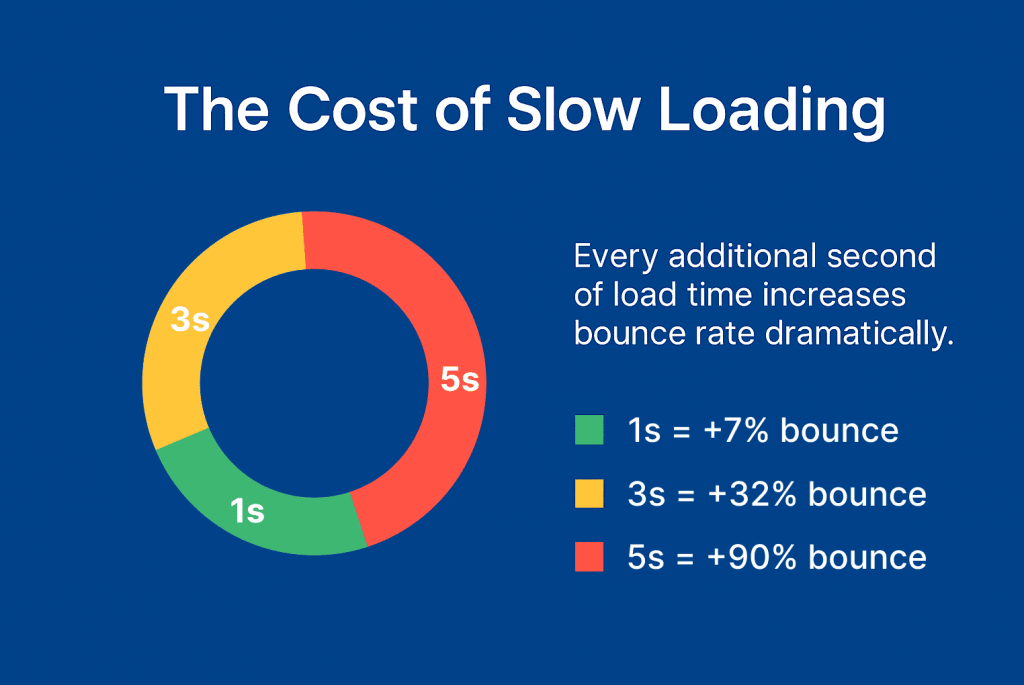
Website loading speed matters because it affects three things at once: whether visitors stay, whether they convert, and how well your pages perform in search. Even a one-second delay can cost conversions on high-intent pages such as pricing and checkout. The exact impact varies by site and audience, so check your own analytics before relying on industry averages.
How Slow Pages Cost Revenue and Conversions
Picture a mobile visitor who taps a service page from a search result and waits six seconds. Many will leave before the first section appears. You have already paid for that click, whether through ads or months of content work, and you get nothing back.
The damage rarely stops at one lost sale. Slow checkout steps raise cart abandonment, and slow landing pages weaken campaign results. Repeat visitors also lose confidence. Teams often blame ad creative or pricing when the real culprit is a heavy page.
What Website Loading Speed Means for SEO and Trust
Google uses Core Web Vitals in its ranking systems, but speed is one signal among many. Relevant, well-written content still carries more weight. Think of speed as a tiebreaker that matters most when competing pages are equally relevant. Slow pages also lose people before they read or buy, which undercuts the return on organic traffic. For on-page steps beyond speed, our guide to SEO-friendly website development tips is a useful next read.
Trust works in a similar way. A page that responds quickly feels reliable and professional. One that stutters makes people question the business behind it, particularly in finance, healthcare and ecommerce, where visitors are asked to share payment or personal details.
Core Factors Affecting Website Loading Speed
Four things account for most slow websites: hosting and server distance, heavy code, unoptimized media, and inefficient database queries. Fixing them roughly in that order often gives the quickest return, because server response time sets the floor for every other metric.
Hosting, Servers and Distance
If your server is overloaded or far from your audience, every request starts late. A shared hosting plan that coped with a few hundred visitors a month may struggle when a campaign sends several thousand in a week. Pairing a suitable hosting plan with a content delivery network (CDN) shortens the distance between your files and your visitors. A CDN is a network of servers that stores copies of your files in many locations.
Code, Media and Database Weight
Bloated scripts, unused plugins and tangled stylesheets all add processing time. Clean, modular code helps browsers render pages sooner. Caching spares returning visitors from downloading everything again.
Images and video usually make up the largest share of page weight, so uncompressed files can add several seconds on their own. Databases deserve attention too. Redundant entries and unindexed queries slow content retrieval, which shows up quickly on dynamic sites such as stores and booking platforms. Plugin sprawl and skipped cleanups are among the Common Website Development Mistakes that quietly add weight over time.
How Website Loading Speed Shapes User Experience
Website loading speed shapes user experience by setting the tone before design or content has a chance to work. Visitors who see meaningful content within a couple of seconds tend to keep exploring. Longer waits build frustration, and exits follow.
Smooth navigation, polished animation and clear layouts only count once the page has actually loaded. Stability matters as well. A page that loads quickly but jumps around while images and ads appear still feels broken, which is what Cumulative Layout Shift measures.
How Website Loading Speed Affects Mobile Visitors
Mobile visitors are often multitasking on variable networks, so their patience is lower. A page that feels fine on office Wi-Fi can feel sluggish on a mid-range phone with a weak signal. Test on real devices, not only on a fast laptop.
A Responsive website development approach helps here, as long as it serves appropriately sized images and lighter layouts to smaller screens. Shrinking a desktop page into a mobile viewport does not make it faster.
Testing and Measuring Website Loading Speed
Test website loading speed with Google PageSpeed Insights, Lighthouse or GTmetrix, and judge the results against the three Core Web Vitals. Lab tools show what you can fix. Field data from real visitors shows what users actually experience, and the two do not always agree.
The Three Core Web Vitals to Track
Google’s current Core Web Vitals are Largest Contentful Paint (LCP), Interaction to Next Paint (INP) and Cumulative Layout Shift (CLS). Each is assessed at the 75th percentile of real visits.
- LCP measures how quickly the main content appears. A good score is 2.5 seconds or less.
- INP measures how fast the page responds to taps and clicks. A good score is 200 milliseconds or less.
- CLS measures visual stability. A good score is 0.1 or less.
Many older guides still list First Input Delay (FID). Google replaced it with INP in March 2024, so any checklist that includes FID is out of date. Time to First Byte (TTFB) is not a Core Web Vital, but it remains a useful diagnostic because a slow server response drags LCP down with it.
Tools and Ongoing Monitoring
PageSpeed Insights combines lab results with real-user data where enough exists. Lighthouse and GTmetrix break down network requests, render-blocking files and unused code. The Core Web Vitals report in Google Search Console groups problem URLs so you can fix a template once instead of page by page. Device emulators and cross-browser platforms, such as those in our list of the best tools for responsive web design, help you confirm results on screens your visitors actually use.
Testing is not a one-time task. New plugins, themes and content updates can change load time overnight. Automated monitoring with alert thresholds catches slowdowns before they reach customers or rankings.
Strategies to Improve Website Loading Speed
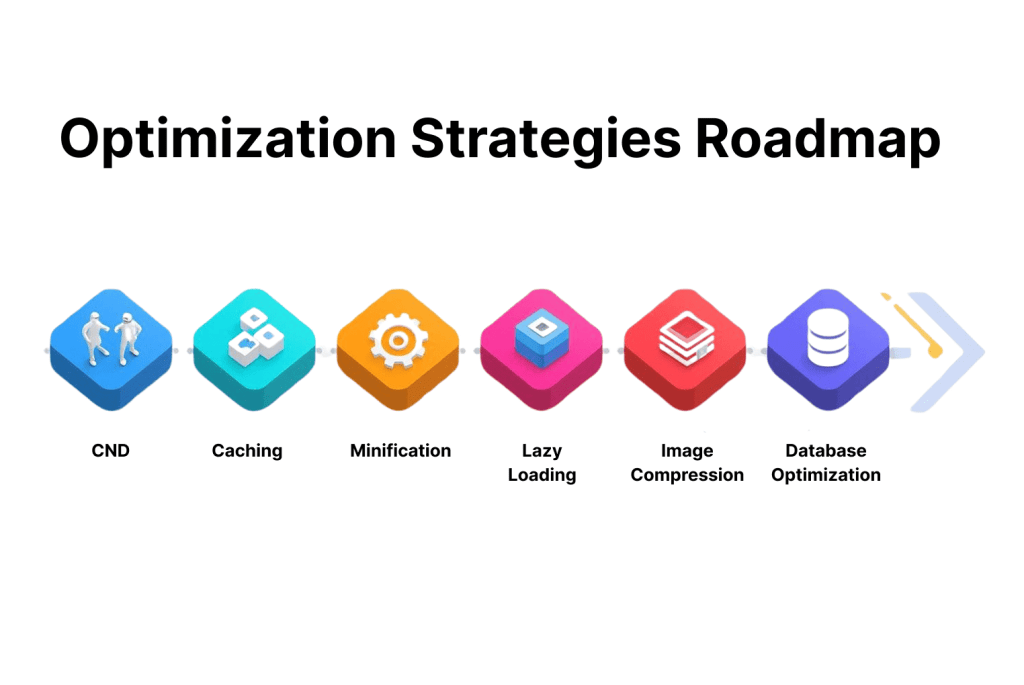
The fastest gains usually come from five actions: serve files through a CDN, enable caching, minify code, compress and resize images, and cut third-party scripts. Start with whatever your test report flags as the biggest problem rather than the easiest task. If a site is already underperforming, our walkthrough on How to fix slow websites covers diagnosis step by step.
Delivery: CDN, Caching and Minification
A CDN lets visitors load your site from the nearest location. Browser and server caching then stop repeat visitors from downloading unchanged files. Minification removes spaces, comments and unnecessary characters from HTML, CSS and JavaScript, producing smaller files that parse faster. None of these steps is dramatic alone, yet together they often account for a large share of the improvement.
Images, Video and Third-Party Scripts
Compress images, choose modern formats such as WebP, and serve sizes that match the device. Lazy loading helps by deferring images and video until a visitor scrolls to them. One caution: do not lazy load the main image at the top of the page, because that delays LCP instead of improving it.
Third-party scripts deserve a regular audit. Chat widgets, tracking tags and ad libraries are frequent causes of poor INP and layout shift, and teams tend to add them without ever removing the old ones. Database optimization finishes the job on dynamic sites.
Improving Website Loading Speed on Mobile and Apps
Mobile and app performance depends on the same principles as desktop sites, applied with less tolerance for delay. Lightweight code, adaptive images and fewer server calls matter most, because phones have weaker processors and less predictable connections.
Mobile Websites and Ecommerce Checkout
For ecommerce brands, product pages, payment gateways and checkout forms need to respond instantly, since every extra second invites abandonment at the point of purchase. Responsive design alone is not enough. Test the full buying journey on a mid-range phone over a throttled connection before every major release.
Progressive Web Apps and Hybrid Apps
Progressive Web Apps (PWAs) offer near-native experiences, but they rely on well-planned caching, lightweight code and background syncing to stay fast. Hybrid apps face a similar trade-off between cross-platform flexibility and speed, so streamlined APIs and tidy code matter. Scalability is the other risk. Features that feel quick for 1,000 users can slow noticeably at 100,000 if data transfer and server communication were never planned for growth.
Teams building an app alongside their website can work with a mobile app development company in chennai to set performance targets for both from the start, rather than fixing speed after launch.
Why Website Loading Speed Needs Continuous Optimization
Speed decays. New features, third-party integrations and content updates slowly add weight, so a site that scored well at launch may not score well six months later. Regular monitoring catches problems before they appear in engagement or rankings.
Set Benchmarks and Alerts
Record a baseline for LCP, INP and CLS on your key templates, and review it monthly. Automated alerts that trigger when a threshold is breached let a team respond before customers notice.
Performance should also connect to business planning. Campaigns, seasonal sales and app launches drive traffic spikes, and a slow site can undo an otherwise strong launch. Building speed checks into the website development process, from design review to pre-launch testing, keeps regressions out. Teams with DevOps pipelines can go further by failing a deployment when a performance budget is exceeded.
Advanced Practices for Future Ready Performance
Caching and compression remain the foundation, but several newer practices can add a further edge for sites with global audiences or heavy interactivity. Many of them are visible in current website development trends, though few are necessary for a typical business site.
Edge Computing and Serverless Delivery
Edge computing processes requests closer to the user, which cuts latency and improves responsiveness. Combined with serverless architecture, it lets teams serve dynamic content without relying on a single central server. The trade-off is added complexity in debugging and, in some setups, slower first requests after periods of inactivity.
AI Optimization and Multi-CDN
AI-driven tools can adjust image formats, scripts and delivery based on device type and visitor behavior. Multi-CDN strategies keep global sites resilient by routing traffic through whichever network performs best in a region. Both approaches pay off mainly at scale. For a smaller site, fixing images, caching and scripts will usually deliver more than a new architecture.
How Frameworks Affect Website Loading Speed
The framework you choose sets a ceiling on website loading speed before any tuning begins. Lightweight frameworks tend to perform well out of the box, while heavier ones need careful optimization to reach similar results. When comparing web development frameworks, weigh developer productivity against the weight of the code that reaches the browser.
Static and Dynamic Frameworks
Static site generators usually load faster because pages are prerendered. Dynamic frameworks offer flexibility but can add delays when server rendering, client-side hydration or large JavaScript bundles are left unchecked. A framework that speeds up development but ships bloated scripts can harm long-term results.
Choosing a Framework for Your Industry
Ecommerce platforms need fast responses during peak traffic. Enterprise sites usually weigh stability and scalability alongside speed. Platform decisions, such as the React vs wordpress for business website question, carry the same trade-off between flexibility and out-of-the-box performance. Whichever option you shortlist, test it under realistic conditions before committing.

Conclusion
Website loading speed influences how people use your platform, how it performs in search, and how much they trust the business behind it. A site that loads in seconds signals reliability. A slow one can undo months of marketing in a few clicks.
Improvement is an ongoing habit more than a project. Choose suitable hosting and frameworks, fix the largest bottlenecks first, and measure against LCP, INP and CLS. Then keep monitoring as the site changes. The faster your pages respond, the easier it becomes to turn visits into customers.
FAQs
1. What is a good website loading speed?
Google rates a page as good when its main content loads in 2.5 seconds or less (LCP), it responds to input within 200 milliseconds (INP), and its layout shift stays at 0.1 or below (CLS). These are minimums measured on real visits. Key landing and checkout pages often benefit from being faster still.
2. Does website loading speed affect SEO rankings?
Yes, but modestly. Google uses Core Web Vitals in its ranking systems, yet good scores do not guarantee a top position. Content relevance and quality still matter more, so speed works best as a supporting signal.
3. Is First Input Delay still a Core Web Vital?
No. Interaction to Next Paint (INP) replaced First Input Delay on March 12, 2024. INP is stricter because it reflects responsiveness across all interactions during a visit, not just the first one.
4. Is a CDN enough to make a website fast?
Not on its own. A CDN reduces distance and speeds up file delivery, but it cannot fix oversized images, render-blocking scripts or a slow database. Treat it as one layer in a wider plan.
5. Do I need a perfect PageSpeed Insights score?
No. A score of 100 is rarely worth the effort. Focus on passing LCP, INP and CLS in real-user data, and prioritize fixes that affect your highest-traffic and highest-revenue pages.
6. Why is my website loading speed slower on mobile than on desktop?
Phones have slower processors and less stable connections, so the same page does more work with fewer resources. Large images, heavy JavaScript and third-party scripts hit mobile hardest, which is why mobile results are usually the better benchmark.